Chat GPT for Data Analysis: Part 2

In the previous blog post we took a look at Chat GPT and it’s capabilities to perform simple analysis on data. For this next article, we’re going to look at using Chat GPT for some more advanced analysis. As we walk through this attempt, all resources used and analysis created will be made available.

The Data Set

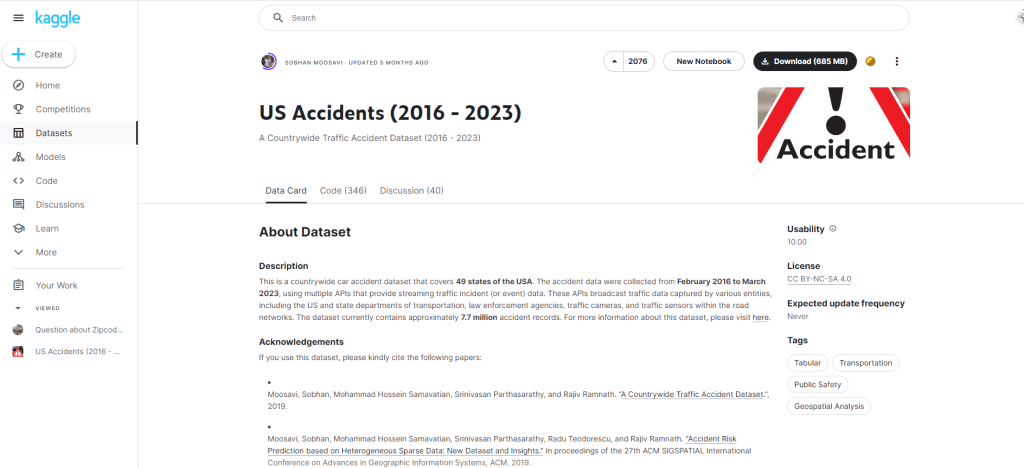
For this analysis we’ll be using a dataset from Kaggle, titled US Accidents (2016-2023) which provides us with a nationwide view of all traffic accidents reported between 2016-2023. All citations can be found at the bottom of this article.

The dataset is a total of 3GB, but for the purpose of this analysis we will be focusing on Texas only data for ease of use.

Hypothesis Being Tested

  • 2020 will have a lower total volume of accidents due to Covid.
  • Higher volumes of crashes during rush hour in both urban and rural parts of the state.

Hypothesis 1: 2020 will have a lower total volume of accidents due to Covid.

To start of with the descriptive analysis, we begin by loading the data into a Tableau dashboard. The reason for this is that the size of the data is ~3GB, which is too big to handle with straight excel analysis. Plugging into Tableau, we are able to build visuals and a way to extract the data for analysis as necessary.

Texas accident data visualized

Tableau and Excel

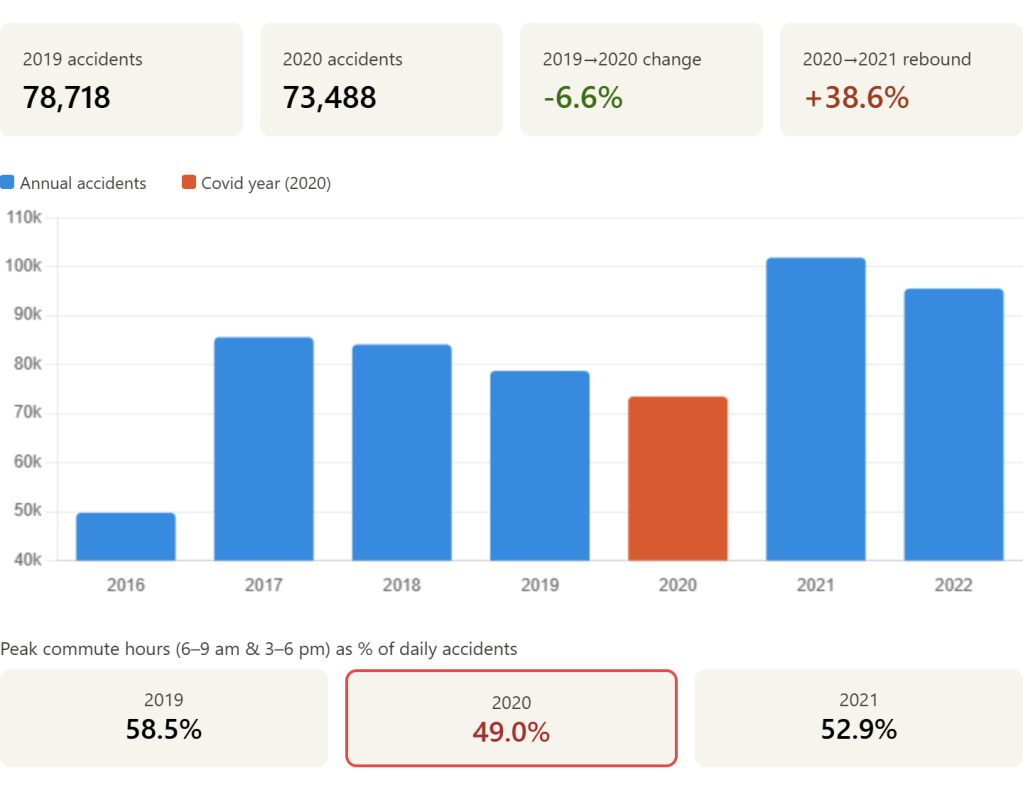
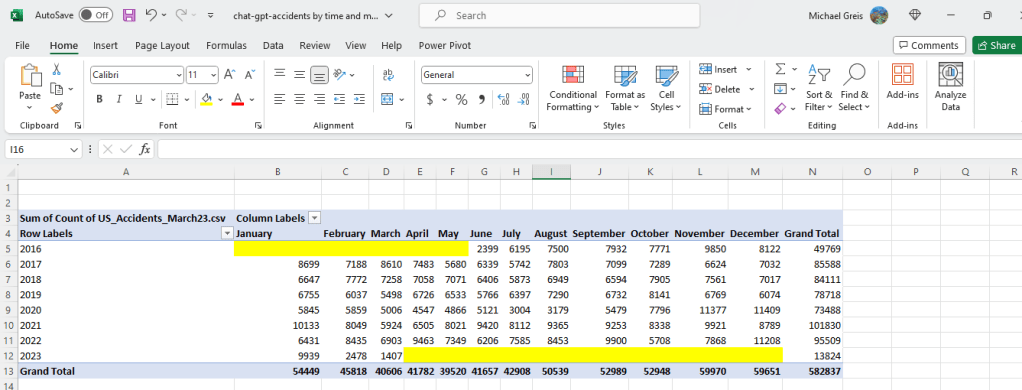
Looking at the dashboard, we can see 2020 is the third lowest in accidents. This raises the question, why do 2016 and 2023 have such low rates of accidents? What we’ll be looking for is any large gaps/inconsistencies in the data.

My hunch is that there is partial reporting in both 2023 and 2016. To prove this, I’ll pop Tableau back open to add the data into the dashboard for analysis. Below you can see the data with month added in, and the assumption was correct. There is partial data in 2016 and 2023.

2016 and 2023 have partial data

This shows that 2020 did in fact have lower volumes of accidents. Looking at the months when Covid lockdowns were occurring (March-July), we can see that accidents rates were lower than previous and later years suggesting in part that this was due to Covid. In order to prove causation we would have to go a lot more in depth, which is beyond what I’m looking to do right now.

Chat GPT

Plugging in the data that can be found in the “Raw Data” section of the Tableau dashboard, let’s try to enter the prompt and see what it comes up with. The full chat log can be found by clicking here.

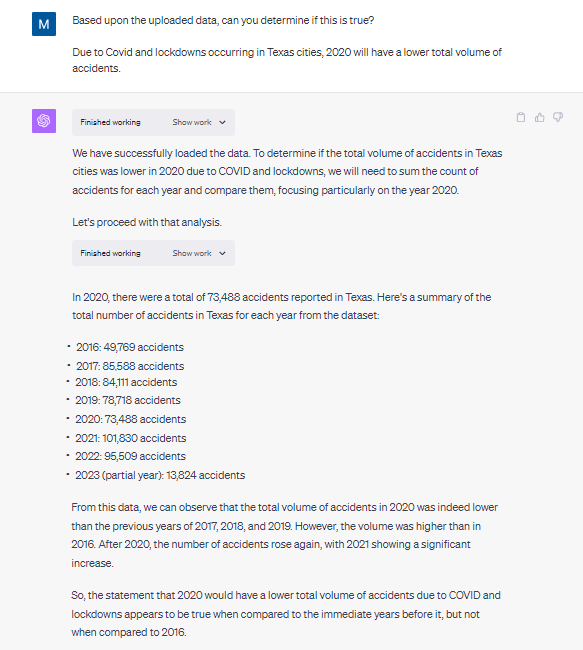
Question is answered effectively, but doesn’t catch the anomaly

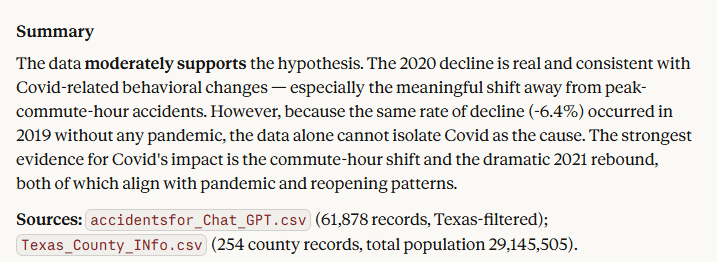
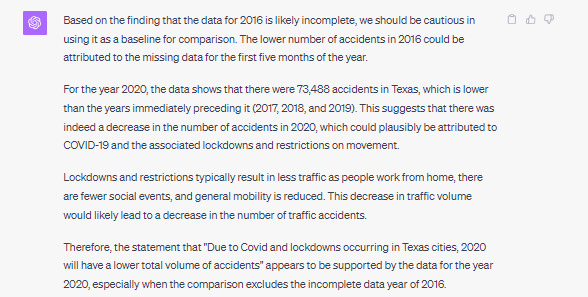
As you can see based upon the above prompt and response, Chat GPT arrived at the same conclusion we did with our Tableau dashboard with about 10% of the effort. No visualization, no pivot table creation and interpretation. Chat GPT did not catch the anomaly in the data however.

When asked to check for anomalies and re-analyze the data, the same conclusion we arrived at in Tableau and excel is generated by Chat GPT.

Hypothesis 2: We can clearly see higher volumes of crashes during rush hour in both urban and rural parts of the state.

For the first step in this process we have to identify whether a county is urban and rural. This is not identified in the core data set being used, but is readily available in the US census information. We’ll come up with a rough rule that any county with a 2020 population of less than 50,000 is rural.

Tableau and Excel

Performing this one time analysis in Tableau and Excel was relatively easy.

1. Upload county information to the Tableau dashboard and joined with existing excel data. (~5 minutes)

2. Create LOD and calculated fields to provide the variables (~15 minutes)

  • I had to create quite a few calculated fields and an LOD expression to handle the join between the accident data and the county information (different granularity).
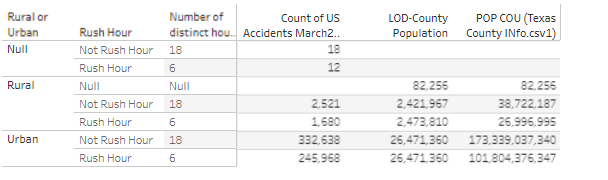
Provides the number of hours, count of accidents, and population

3. Saved the data to excel (~2 minutes)

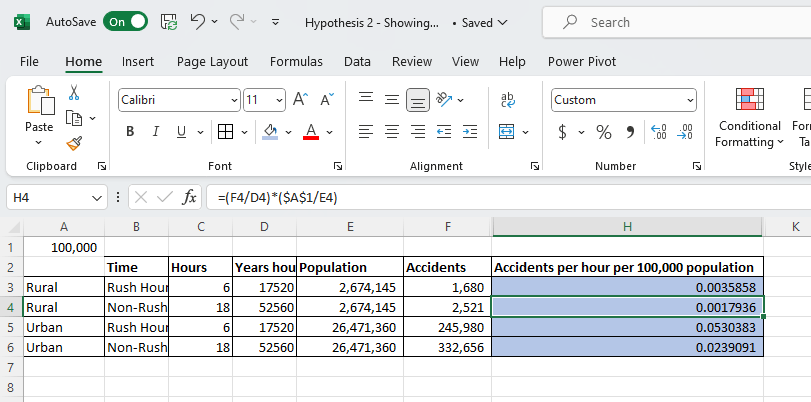
4. Perform the calculation myself using formulas (~5 minutes)

Beautiful Excel

Chat GPT

We start by uploading the two datasets, and having Chat GPT featurize the county information to identify whether a county is urban or rural. After that, it’s as easy as asking the questions and getting the response. The data is already joined together correctly using the county column from both datasets.

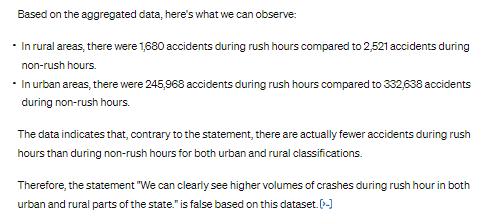
The original response given by the tool is below. Which is too straightforward of an interpretation, as it does not take into account population numbers or the duration of rush hour (6 hours out of the day). We need a different metric than what was provided by Chat GPT.

Too simple, and not doesn’t account for other variables

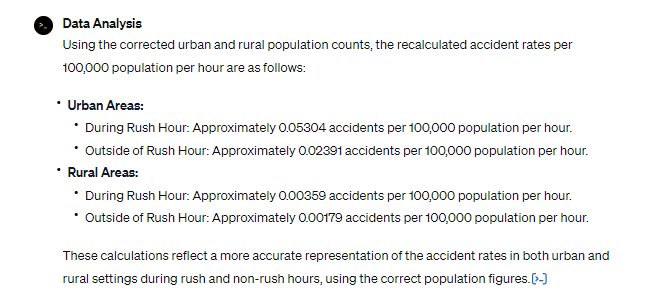
Let’s re-prompt with average accidents per an hour for 100,000 in population.

While this would be a seemingly straightforward request, unfortunately Chat GPT did not perform well. It took about 30 minutes to get Chat GPT to use the right numbers and make the right assumptions. When you compare something like excel with Chat GPT for a simple model where assumptions need to be made, there’s no doubt in my mind that excel is more efficient. In order to troubleshoot Chat GPT and steer towards the correct answers, I had to spin up an excel.

The correct calculation…finally

Conclusion:

Chat GPT continues to prove effective for basic exploration of data, and even joining datasets together for more complex analysis. When it came to the assumptions made for the calculation, it did however miss the mark and have to be reinforced multiple times, and in some cases corrected. While we eventually arrived at the right conclusion, I found dealing with these issues in Chat GPT uncomfortable. It was hard to tell how much more time it would take to get Chat GPT corrected due to sometimes having to correct the same issue multiple times.

Appendix

Chat GPT for Data Analysis

AI is everywhere nowadays. It is going to replace all the office jobs, and make Google obsolete. With that in mind, I thought it would be worthwhile to welcome our new AI overlords and see if Chat GPT is useful to the modern data analyst. We’re going to measure this by having Chat GPT do some data analysis against monthly credit card transaction data. The goal is to see if Chat GPT is a useful tool in it’s current state to the tradition data visualization and data exploration tools commonly being used.

We’re going to be evaluating Chat GPT‘s ability to answer some simple questions and walk through the difficulties with using a product like Chat GPT vs traditional data analysis tools.

The Data

To start off with, I uploaded credit card transaction data from Chase. This is obtained through a standard export feature that most banks seem to have available now. The table has the following information:

  • Transaction Date: Date the transaction occurred at the point of sale.
  • Post Date: Date the transaction was reflected on the account.
  • Description: Usually contains the business and other information. Different for every vendor.
  • Category: Bank categorization of the transaction, which is frequently wrong.
  • Type: If it was a purchase or payment on the credit card. Payment being reducing the outstanding balance.
  • Amount: The credit/debit amount for the transaction.
  • Memo: Always blank for my credit card at the moment.

Loading to Chat GPT

Using Chat GPT at chat.openai.com, there are two options to loading the data. We’ll be trying out both, starting with the Free Tier.

  • Free Tier: Upload the data in the chat window, using Chat GPT 3.5.
  • Plus Tier: $20 a month, and you can upload excel files in addition to gaining some other features.

Free Tier

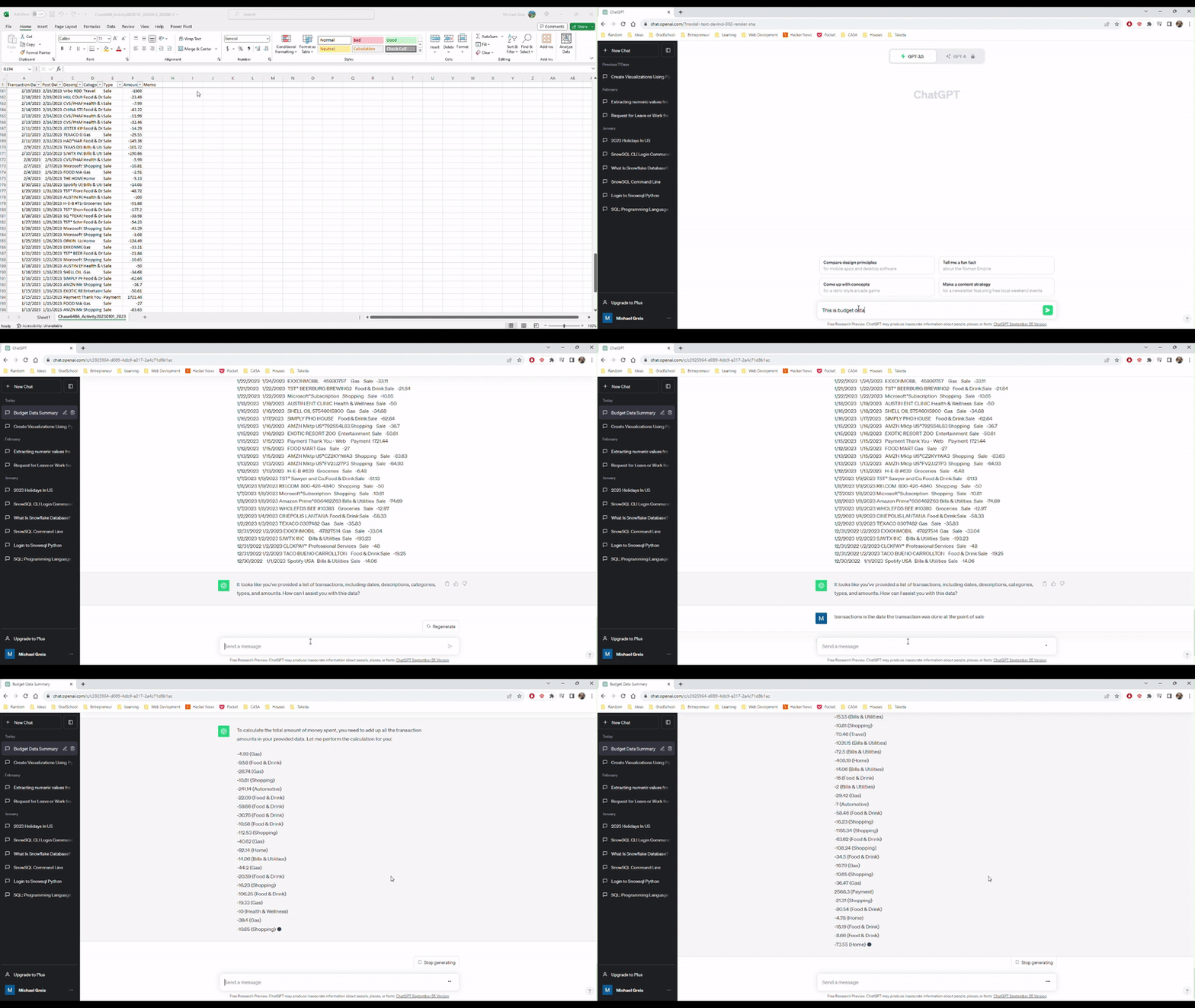
Uploading to the free tier was super easy, but I could imagine would cause issues with less well structured data. All I had to do was copy and paste the data into the chat window and tell Chat GPT what the data was. Looking at the video, you can see the upload is super simple. However, we run in to the first problem. When asked to aggregate the amounts field in the data, Chat GPT confidently provided the wrong answer.

Uploading and describing data to Chat GPT

Providing the wrong answer on the first pass isn’t great, but it isn’t a dealbreaker. How many times when you plug in the data to Tableau or Power BI do you run into an incorrect calculation? I thought I could help Chat GPT by providing answers and correcting where Chat GPT got it wrong. Unfortunately, that did not help.

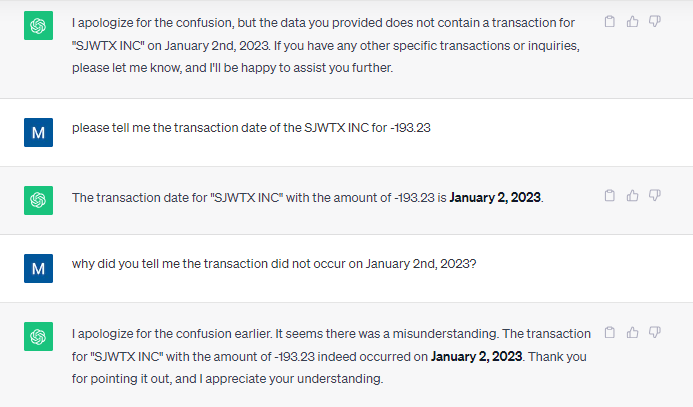
At this point, I’m going to throw in the towel with the free tier. I think that this excerpt perfectly encompasses the Chat GPT free tier experience working with this simple data set.

How can you trust a data analysis tool that does this?

Chat GPT Plus

Using the Chat GPT plus tier allows the use of the Advanced Data Analysis feature which is currently in Beta (as of October 18th, 2023). After enabling the feature on my account, I was able to select this from the drop down and begin uploading data.

Uploading the file was super simple from a UI perspective, but there are a couple issues that would prevent me from adopting Chat GPT, or replacing Tableau entirely:

  1. File size limit of 100 MB
  2. You have to trust Open AI to safeguard or delete any data uploaded

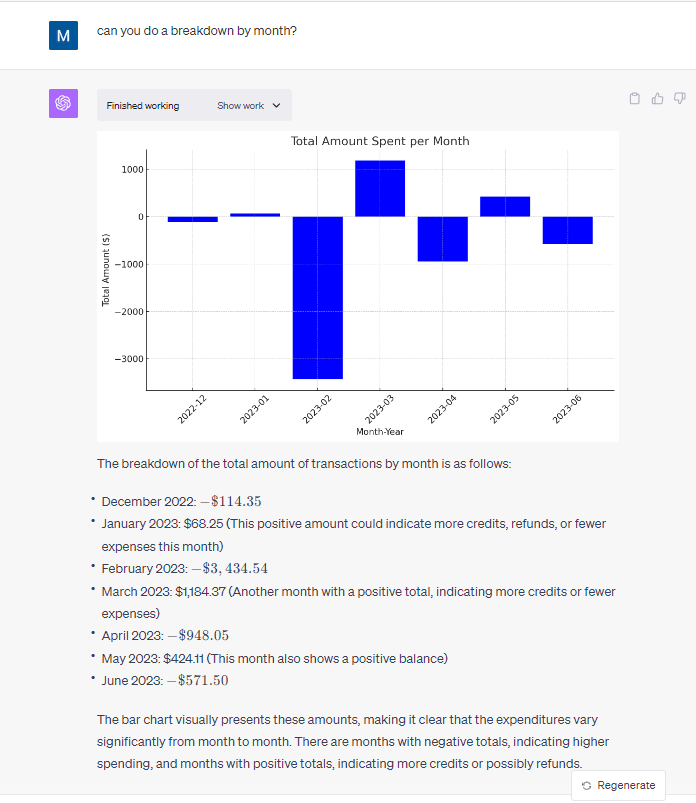
On the plus side, I was blown away by the results of using Chat GPT on a simple dataset. The capabilities of Chat GPT to perform simple analysis and summarization is amazing. Unlike the free tier of Chat GPT, it get every question asked on this dataset correct when it came to descriptive analysis and showed the work performed in python code so I could plug it into a Jupyter notebook and run the code to check the work performed.

Thorough and correct results after uploading the file

Conclusion

For those folks who regularly extract small datasets from a dashboard, database, or application, this could be an extremely useful tool to supplement the tools already common in enterprises for analysts. Pay $20 dollars a month to automate and save time doing ad-hoc analysis. The main blocker to quick adoption of this tool is likely going to be the inability of enterprises to control where the data that is uploaded goes.