
Data Day Texas 2017 – A Few Thoughts

Earlier this month I had the opportunity to attend Data Day Texas, and thought that it would be worthwhile to jot down a few thoughts. For those that aren’t aware of Data Day Texas, think of it as a gathering of nerdy IT people and Data Scientists. It was an interesting weekend with a wide range of topics that encompassed everything from machine learning algorithms to more approachable subjects like data dashboarding.

Graphs Are Here

There’s a reason that the keynote by Emil Eifrem was named “The Year of the Graph”. Looking at the popularity trend on db-engines.com, you can see a large gain in the
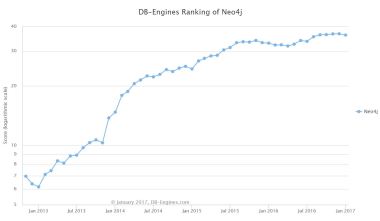
neo4j-popularity

Neo4j Popularity

popularity of Neo4j. Leading naturally to the question, so what?

I think the major winning point for graph databases, other than performance on certain types of data analytics, is that graph databases are defined with relationships between data. This is in opposition to the approach of the traditional RDBMS which requires explicitly defining the tables in the schema, with relationships as a non-required afterthought in most cases. This means that while constructing the database, what you are doing is explicitly defining the node (core piece of data) and the edge (relationship between nodes). This means that you are enforcing the relationships between data, as opposed to the structure of the data itself. This creates another level of abstraction between the end user and the data, which should make the data in the database more approachable. Oh, and if you haven’t guessed, graph databases are schema-less which is a plus in many cases.

Issues Are Similiar Across Companies/Technology

In particular, there were two talks that hit this point home. The first was given by Chris LaCava from Expero Inc. in which he discussed visualization techniques with graph databases. The second was the discussion of how Stitch Fix sets up their environment for data scientists to work by Stefan Krawczyk.

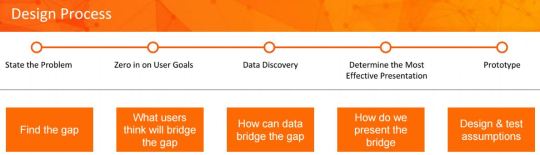
What’s the root of this? People want to use the tools that work and that they like. Chris LaCava discussed how to do visualization on graph databases. While graph databases can
dashboarding-design-process

Look familiar? From Chris’ presentation on graph database dashboarding

meet some cool use cases as far as data sets and real time analytics go, what was discussed was a  straight forward and common sense approach to dashboarding. Anyone familiar with Business Intelligence and dashboarding should roughly be following the above, or near to it.

Stefan‘s talk was all about using Docker to enable data scientists to use the tools that they want to use. The solution to the complaint that many of us in the industry have when we are locked in with a specific tool-set. The differentiation here was that Stitch Fix has done containerization at scale. This solves that problem by allowing each of their data scientists to run and operate on their own environment, with whatever tool-set they favor to deliver business value.

The Story is What Makes Things Interesting

The final point, which I’ve written about before, is that the story is what makes things interesting. The specific story presented at Data Day? The Panama Papers and how Neo4j was used to discover the unlikely connection that led to the downfall of a Prime Minister. That this was the best marketing tool that I have ever seen in regards to a database.
Having a database GUI that allows for easy exploration of the data natively? That’s a game changer.

This slideshow requires JavaScript.

Looking at the above, you can see a traditional RDBMS GUI (SQL Server Management Studio) versus Neo4j’s GUI. There’s a reason why people don’t pull up SQL Server Management Studio tools to tell a story. Having a database platform that can automatically tell a story about the data is an awesome approach.

 

Down with Vertical Database Architecture

The goal of gathering data can be broken down into a combination of any of the following free. Understanding what has happened, what is happening, or project what will happen. When getting answers to these questions, as long as the answer is obtained, why does it matter how the answer was obtained?

Getting a view into this information can be done many different ways, and with the products available on the market can be done for free and with minimal IT know how. There is a time and a place to pay a premium on IT projects to obtain the capabilities that Skyscraper_Diagramnone of your competitors will have. When a solution needs to be scale-able and tailored to your unique needs.

This is when architecture comes in.

Just like any structure, a database architecture can be flat or tall. What is the difference? To
run with analogy of comparing database architecture to buildings, a skyscraper (vertical) is much more complex to build and maintain compared to a house (horizontal).

Horizontal

A horizontal architecture can be pictured like a suburb. This translates to a house that is commissioned by you that is easily customizable and suited to your needs and wants. Do you want a pool? Easy. Do you want a larger living room or a smaller kitchen? That can be done.

Taking this analogy from building skyscrapers to databases, a flat architecture means that your data is displayed from a single (or as few as possible) levels. It is much easier to understand how the wiring, plumbing, lighting, etc. were put into a house when compared to a skyscraper. Additionally, when you want to install a pool, it’s much easier to install and maintain than a pool on the 23rd floor of a high rise.

Architecture Diagram

Vertical

A vertical architecture means many structural layers in the database, and with it comes complexity. The difference between the physical skyscraper and databases? Skyscrapers are generally created when there is no more land to build flat, this law of physics doesn’t apply to databases.

Why would anyone build a vertical architecture than? In my experience time and resource constraints effect (two thirds of the magic time-resource-quality triangle), short-term thinking.

Benefits of Horizontal

  1. Decrease in cost: Less people to maintain complex solutions, and more time spent creating value for you.
  2. Higher quality: More visibility into what is happening where. Instead of having to dive through and learn how everything was built, people playing with the data only have to learn specific portions which they are interested in.
  3. Faster delivery: The final win on a flat architecture, is speed of delivery. By reducing complexity people spend less time learning, and more time creating value. While in the immediate you may save time in the short-term with a vertical architecture, you will pay dearly in the long-term.

Uses of YouTube

Well, I’ve done Facebook, so might as well move onto YouTube right? Facebook of course has video, and who will win the YouTube vs. Facebook video showdown is very much up for debate. Due to the tech of both of the platforms being at the top of their game, and the user community of YouTube being just as atrocious as the Facebook there aren’t many surface level differences. So what distinguishes YouTube from Facebook?

How to Videos:

YouTube has always been a great channel for getting to how to videos. Everything from car repairs to software programming videos are on the site. Does the same content exist on Facebook? Let’s see…

This slideshow requires JavaScript.

Comparing the two, YouTube looks much cleaner, and more to the point. I don’t see a “Trending” bar on the right side of the screen, or my Facebook friend’s post as the first result. This may be due to YouTube being owned by Google, but the search results are much cleaner and to the point.

Subscriptions:

In my Facebook post, I mentioned the low quality of content on the Facebook professional groups. With YouTube, the focus isn’t on the social aspect. When subscribing to a channel, all that is presented to the viewer is content from the channel. Due to this, the potential effect that the vapid user base of YouTube could have on getting to the content is minimized. Facebook puts the user community interactions front and center, while YouTube makes you dig to the comments section to interact with the fellow users.

This slideshow requires JavaScript.

I subscribed to three channels, The Economist, Fizzle, and TedxTalks in order to explore a range of topics applicable to my career. While the focus of each of these three channels is different, the general reasoning behind the selections is that I want resources centered around world events and trends, with Fizzle throwing in more specific information on marketing, entrepreneurship, and building a brand. Having targeted content at your fingertips is always a good thing in my book. The other big plus of YouTube? Whatever of these three channels that I navigate to on YouTube, the information is displayed efficiently and the noise present in Facebook is not present.

Establishing an Online Presence:

YouTube offers to host videos for free, so why not take advantage of this…

The other plus? My high school friends aren’t friends with me on YouTube, so this is totally green pasture. Hosting videos on YouTube seems to be yet another location that an online presence can be established that is professionally facing. Overall, YouTube is much more usable and useful for video sharing and sharing non-personal information. I much prefer the subscriptions and search engine of YouTube to Facebook’s clutter.

If you are trying to build a personal brand, or learn about…really anything I guess? YouTube is a great source. Find channels that would be helpful, subscribe, and watch the content in an incredible friendly user interface. Additionally, if the mood strikes, anyone can easily post an elevator pitch to add a more personal touch to their online presence. If I have anything technical to show, or how to videos that I’m going to do, they will be on YouTube. At this point, I’m fully content to be a watcher until I have content that will be enhanced by sharing through video.