Building a Serverless Data Ingestion – End Result

In this final post, we’ll go over the final implementation of this serverless data ingestion pipeline. What is the result of all the effort put forward to build this serverless data ingestion process? I think the best way to break this down is to compare what we were originally aiming for, and what was implemented. Below you can see diagram that was created in the post outlining the overall architecture.

Pictured on the left is what was originally proposed. On the right, is what was actually implemented. Turns out the implementation pretty much stuck to the plan, with the additional enhancement of using an event to kick off the Lambda functions. This allows for everything to kick off in the appropriate sequence once a file is placed in our “ingestion-bucket-11.15.2021”.

The usage of AWS events to kick off Lambda functions was extraordinarily easy, and there’s plenty of good documentation to get started. The S3 event passes through all the metadata needed to parameterize and operate the pipeline in JSON. The documentation from Amazon, makes it super easy to access and use when setting up your Lambda functions.

Below you can see the actual code executed in the Lambda function. Notice that the variables bucket_name and file_name are both retrieved from the event.

from classes import ingester as ing
from classes import forstaparser as fp

def lambda_handler(event, context):
 bucket_name = event['Records'][0]['s3']['bucket']['name']
 file_name = event['Records'][0]['s3']['object']['key']
 target_bucket = 'landing-bucket-11.15.2021'
 upload_table = 'landing_table'
 source_type = 's3'

 if bucket_name == target_bucket:
  upload_file_name = ing.ingester.convert_object(None,bucket_name,file_name)
  raw_logs = fp.parser.read_logs(None,source_type,target_bucket,upload_file_name)
  fp.parser.dynamo_landing_load(None,upload_table,raw_logs,file_name)
 else:
  landing_ingester = ingester.ingester()
  landing_ingester.copy_bucket(bucket_name,target_bucket)
  #test_parser.t_parser()
 print("Completed")

Put simply, the function does the following. First it receives the event metadata, parses through the JSON, and obtains the bucket name that we want to transfer the files from. Notice we can point to any bucket, and it will always drop the file into ‘landing-bucket-11.15.2021’. Using the event metadata means I can reuse this Lambda function as often as I want to create a central dumping ground for staging data to be loaded.

Second, once files are put into ‘landing-bucket-11.15.2021’ another event kicks off. This event cleans the data, ensuring proper encoding (UTF-8), and then loads the data into our DynamoDB landing table. All in all pretty simple.

Below you can see everything running in action.

As we can see above, the files were automatically copied, and for posterity’s sake, we can check the cloud logs to see we have a 100% success rate in the last hour. Looking at the below we can see the result of 100% successful executions for our first Lambda function.

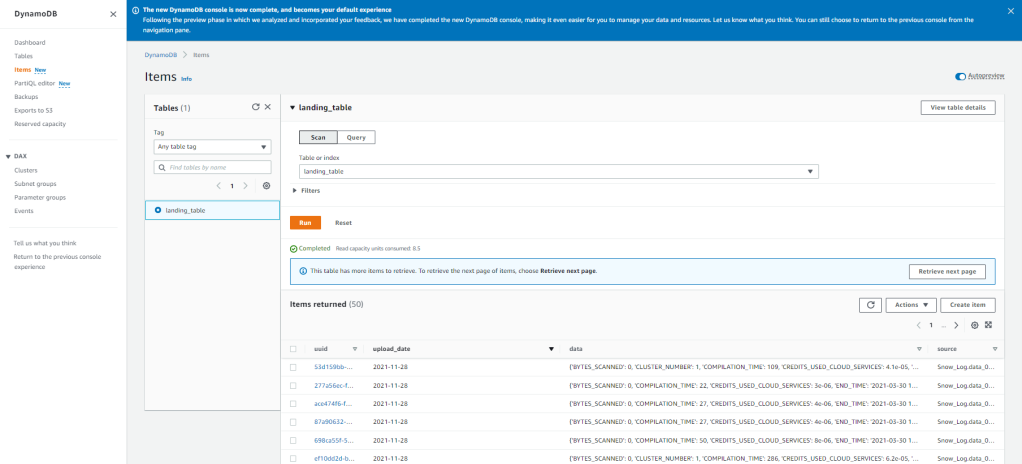
The next step is automatically kicked off whenever an object is PUT into the ‘landing-bucket-11.15.2021’ and loads the data into DynamoDB. With the current setup, we can see the data uploads successfully and the data is now available in DynamoDB to be ingested into whatever processes/analytics we want! The best part being that once this is setup it is automated, and auditable going forward due to the tools AWS offers.
In order to build this, it may not have seemed like a long journey. But keep in mind, in the process of building this little project out I’ve had to pickup and learn quite a few tools. Docker, Lambda, S3, IAM, Python, Boto3, and a few more tools which we’ve covered in the previous posts. If I need to do this again, it’ll be much simpler based upon what I’ve learned.

Thanks for reading along!

Building a Serverless Data Ingestion – Difficulties

This is part three in a four part series on implementing a serverlessJSON based approach using AWS for data ingestion

Outlining the architecture and development process, I glossed over all of the problems and issues that had to be overcome along the way. The majority of my work life and free time isn’t spent using Python, so the majority of the issues confronted are likely to be straightforward for more experienced developers. Doing something new though, I did run into a few issues which were interesting and warrant at least jotting down for my own memory.

  1. Learning about the Docker File
  2. AWS Lambda events and layers
  3. Learning Boto3

Learning about the Docker File

When starting off with Docker, I was throwing things at the wall and seeing what stuck. Originally, I was using a standard Ubuntu image to do testing from for the final function which would be up in AWS Lambda. This was not the right approach in retrospect. I should have started with the amazonlinux image that is readily available on Docker Hub. Once understanding how to create the Docker File from that image, the next step was understanding how to get the code into the container.

The first instinct I had was to create the Docker File in a specific subdirectory of the code base. I’d have a structure like follows:

The entirety of the GitHub repo is Forsta, with subdirectories serving specific purposes.

  • Database: Contains code to create the DynamoDB database tables, and other configurations.
  • Parser: Has the code for moving the data between S3 buckets and into DynamoDB from S3 buckets. Additionally, it contains functions to clean the data and create a primary/unique key for the DynamoDB table.
  • Test: Contain all unit tests or end to end tests I would need to create. It ended up containing the function executed by the AWS Lamdba function, which needs to be rectified in the future.
  • Docker: The final directory was aiming to be Docker, which would have contained a repository of different Docker Files which would be used for different Lambda functions. That’s where I ran into some issues with pathing.

Based upon where the Docker File was in this path, I was unable to easily use the “add” command which made me unable to pull the required files into the Docker container to test my code. My recommendation, have one main area which the Docker File lives in the topmost directory of your repo (in this case, right below Forsta), and you can easily get all of the code you need into the container.

AWS Lambda

This was my first time using AWS Lambda, and it was a bit bumpy at first. My original approach was to create a class, which I would then call in Lambda. While this was basically what the end result was, the route getting there involved some discovery/mistakes.

The first time I attempted to deploy code to Lambda, I just had the class, zipped it up, and tried publishing the Lambda function. In order to use these published classes, I didn’t think through the fact that something would have to call the function, other than my test scripts.

The second time I published a function, one of my test scripts which worked in the container, to run the desired code to see if it worked. Again, this did not work out. After doing some further research, I found that the AWS Lambda function requires an event to kick off the execution of the desired code. In retrospect, this makes complete sense.

The third attempt I got right, after looking a this great tutorial. The key is to create a wrapper which accepts the right events from the AWS environment which kicks off the underlying code I was looking to execute. You can see the repo here with

from tests import test_parser

def lambda_handler(event, context):
    test_parser.t_parser()
    print("Completed")

All of this could have been averted by reading the documentation before trying to deploy. In order to get to this point, I had to refactor the directory structure a couple times (leading to code impacts), and deploy multiple times. Lesson learned, documentation is in fact worth reading.

Learning Boto3

Let’s start off with the basics. What is Boto3? Luckily, the Boto3 documentation has a simple overview on the landing page.

You use the AWS SDK for Python (Boto3) to create, configure, and manage AWS services, such as Amazon Elastic Compute Cloud (Amazon EC2) and Amazon Simple Storage Service (Amazon S3). The SDK provides an object-oriented API as well as low-level access to AWS services.

– Boto3 Documentation

This library underpins everything that was done as part of the effort. Really, the complications came in the form of understanding how to get the data cleaned in a format that would be useful to have in a DynamoDB table. Trying to get the data to where I needed it was easy.

This can be seen here primarily in the ingester class located here and pictured below.

import boto3
import time as time
import gzip
import json
from io import BytesIO

class ingester():
 #def __init__(self):
 #print the name of all the buckets the configured account has access to
 def s3_list_buckets(self):
  for bucket in boto3.resource('s3').buckets.all():
   print(bucket.name)
   response_dict = boto3.client('s3').list_objects(Bucket=bucket.name)
   print(response_dict.keys())
   #ensures bucket has content before trying to pull content info out
   try:
    response_dict['Contents']
   except:
    print('No objects in ' + bucket.name + ' exist.')
   else:
    print(response_dict['Contents']) 
    objs_contents = response_dict['Contents']
    print(objs_contents)
    #unnecessary, good for reference
    #for i in range(len(objs_contents)):
    # file_name = objs_contents[i]['Key']
    # print(file_name)

# Read data file from S3 location
# Unpack/Unzip into JSON
# Load to landing bucket location
 def copy_object(self,source_bucket,object_key,target_bucket):
   target_object = object_key + str(time.time())
   copy_source = {
    'Bucket' : source_bucket,
    'Key' : object_key
   }
   s3 = boto3.resource('s3')
   landing_bucket = s3.Bucket(target_bucket)
   try:
    landing_bucket.copy(copy_source, target_object)
   except Exception as ex:
    print(ex)
   else:
    print('Success! Object loaded to: ' + target_object)
    return (target_object)

# turns the data contained in the s3 gzip compressed file to text document
 def convert_object(self,target_bucket,target_key):
   data = []
   s3_client = boto3.client('s3')
   read_object = s3_client.get_object(
     Bucket = target_bucket,
     Key = target_key
   )
   read_byte_object = BytesIO(read_object['Body'].read()) 
   raw_data = gzip.GzipFile(None, 'rb', fileobj=read_byte_object).read().decode('ASCII') #.decode('utf-8')
   s3_client.put_object(Body=raw_data, Bucket=target_bucket,Key=target_key[target_key.rindex('/')+1:] + str(time.time())+'.txt')

Looking at the convert_object function, you can see there was quite a bit of finagling needed in order to get the required data format and move the contents into my single landing bucket. This single bucket is where I’m storing all of my information, as outlined in the architecture. After doing this project, I realized the hard part of the library, just like anything, is learning how the different functions return the data and should be used in tandem to make a coherent solution. But I will say, the documentation is great and there are a plethora of resources/blogs.

Specifically, I’ll call out the following as a great place to start when looking to get something like this off the ground and into the cloud.

Getting Started – Snowflake and S3

Snowflakehas been quickly throughout different organizations and geographies over the past few years. With exponential growth each year when looking at their customer base (~100% growth in 2019 fiscal year) and revenue (257% increase year over year in 2019). There has to be something amazing behind this product besides great marketing right?

With that in mind, I figured it would be a good use of time to take a look. One approach to take when assessing new tools is focusing on a few different use cases and evaluating how it stacks up against the competition. When looking at data and analytics tools, one of the first questions always is “can I get the data were it needs to go quickly?”. In this case, we’ll be looking at loading a basic pipe delimited data set used to populate an old Tableau dashboard from an S3 bucket into Snowflake.

For the purpose of this blog post we’re going to focus on bulk loading. The reason for this being that the most basic use case for many data warehousing initiatives are going to be based on nightly loads or a similar non-continuous schedule. Additionally, we’re going to focus on using an S3 bucket which is external to Snowflake for this attempt.

  1. External Tables
  2. Bulk Loading
  3. Continuous loading

Step 1: What data to load?

In this case, I grabbed the pipe delimited text file and dropped it into an S3 bucket. The the complexity will come in the form of managing my VPC and transferring the data from my S3 bucket to the Snowflake’s internal S3 storage.

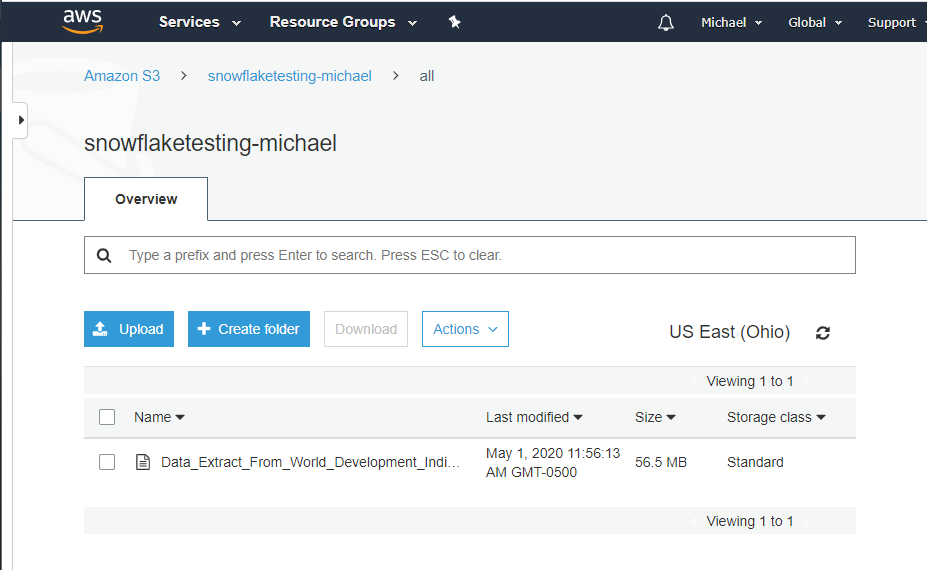
AWS Data

File loaded in Snowflake…Note the size of the file in S3.

Step 2: Grant Snowflake Access to S3

Snowflake exists outside of my main AWS account’s VPC so I need to grant my Snowflake account access to my S3 bucket to copy the data into Snowflake. One important thing to note, is that it is definitely a good idea that you have your S3 data in the same region as the Snowflake instance so that you’re data/traffic stays internal to the AWS network (non-public).

storage-integration-s3

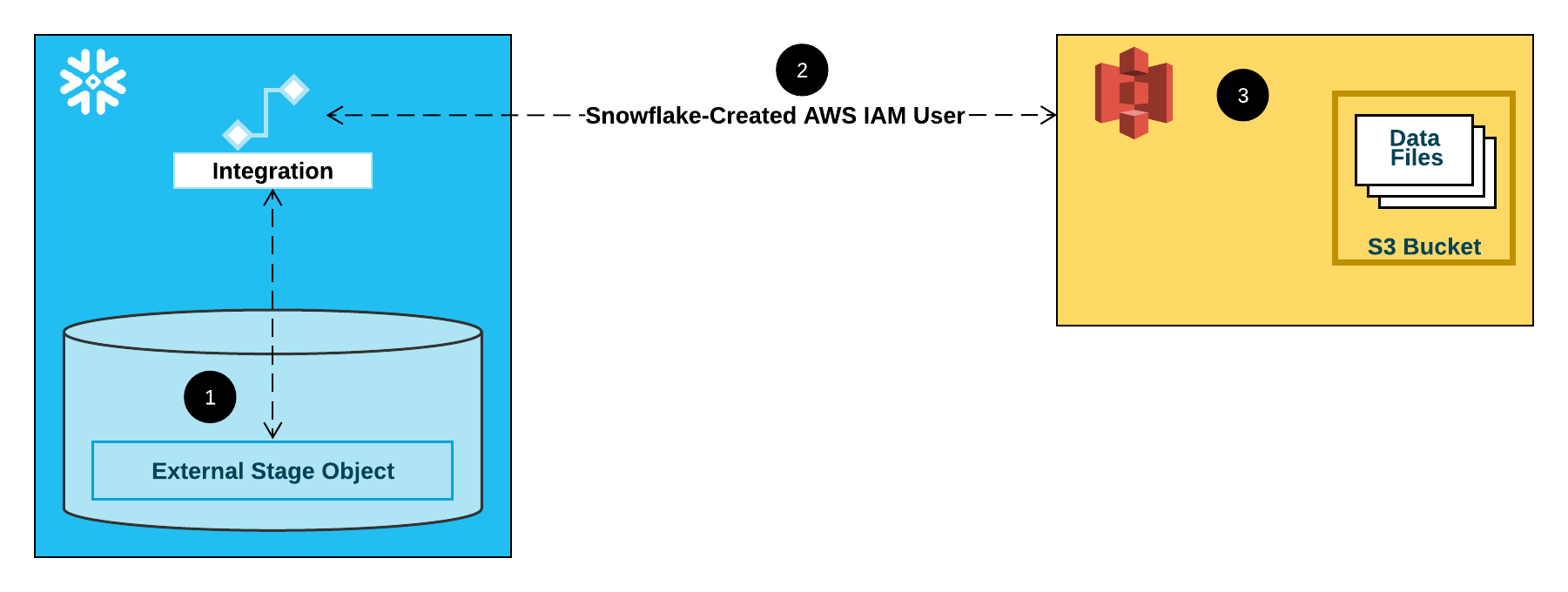
Integration flow for S3 Stage.

Per the Snowflake documentation there are three main options for performing this piece of work. The recommended option is to configure a Snowflake Storage Integration so that we can avoid credential requests while trying to get data loaded.

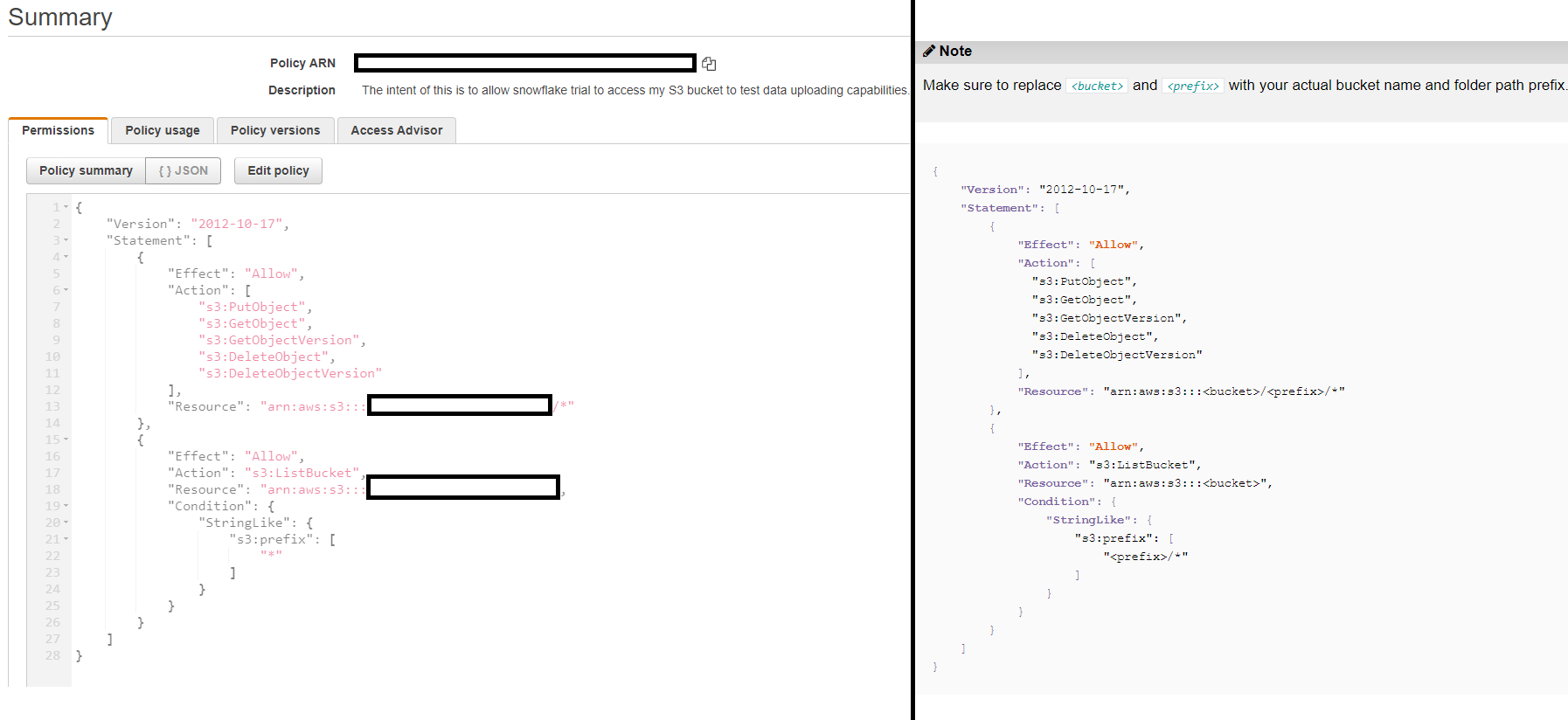
The creation of a policy on my AWS account is the first thing that’s needed.

S3 Policy

On the left is my policy, on the right Snowflake’s standard recommendation for the policy.


Luckily, the process to do this is straightforward. Snowflake goes as far as providing the exact JSON that needs to be pasted in, so it’s relatively easy. The main exception between what Snowflake recommends and the policy I created is the use of the wildcard “*” in the s3:prefix member. It’s fine for my prototyping use case, but if you have more than 1,000 objects in the bucket, a “*” will cause an error when trying to read/copy data to Snowflake.

The second item that needs to be completed is the configuration of an IAM user which will allow your Snowflake account to access the specified S3 bucket. This is the same process used to allow two separate AWS accounts to access one another’s resources because, well, that’s exactly what’s occurring with Snowflake being hosted on AWS. Detail can be found here, but at the end of the day you’ll end up with an IAM user with the policy we created earlier assigned to the account.

Step 3: Setting up a Snowflake Integration

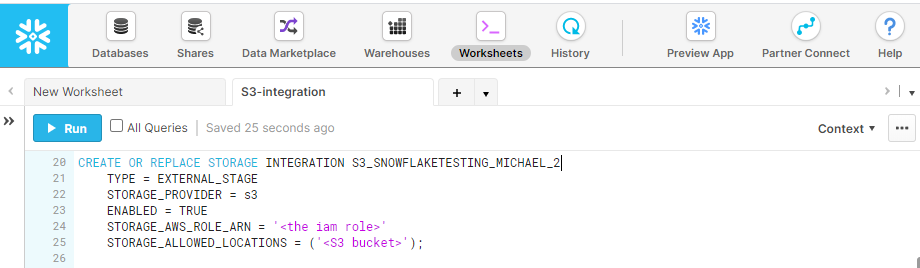
The creation of the integration is what we were striving for all along. The reason for this is that by creating an integration, we have a way to access our S3 buckets without having to log in or supply credentials in Snowflake. If we don’t create this integration, then each time data is loaded credentials will have to be supplied.

Snowflake Integration

Integration creation which will be used to create Stages.

Step 4: Create the Stage

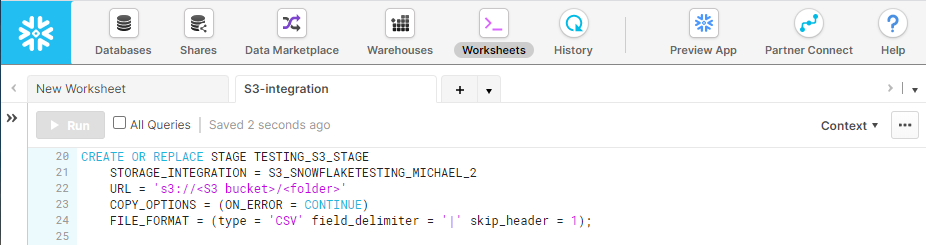
Finally, we have the ability to connect to our S3 bucket from our Snowflake account. We can now specify the Stage that’s needed in Snowflake to actually load the data from the S3 bucket into our Snowflake. There are many options to customize the stage, but for this basic example I know that I have a text file format with “|” as a delimiter and a header row.

Snowflake Stage Creation

Simple stage creation for loading CSV formatted file.

Step 5: Create the Table

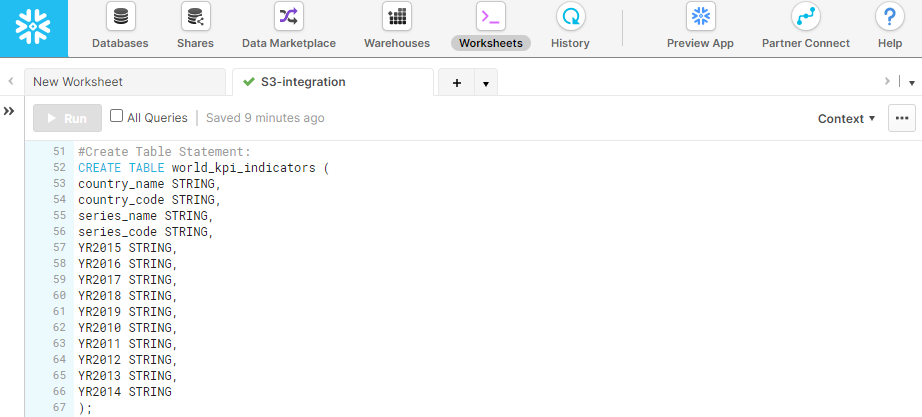
Pretty straightforward. We need somewhere for the data to live once copied into Snowflake from S3. Everyone should be familiar with creating a table using standard SQL. One of the great parts of dealing with Snowflake is the auto-indexing and partitioning right out of the box. So I used the most basic DDL to ensure no data is dropped or skipped in loading due to data type mismatches.

Snowflake Create Table

DDL for table creation, based off the structure of the CSV. All String datatypes for ease of loading.

Step 6: Create the Snowpipe

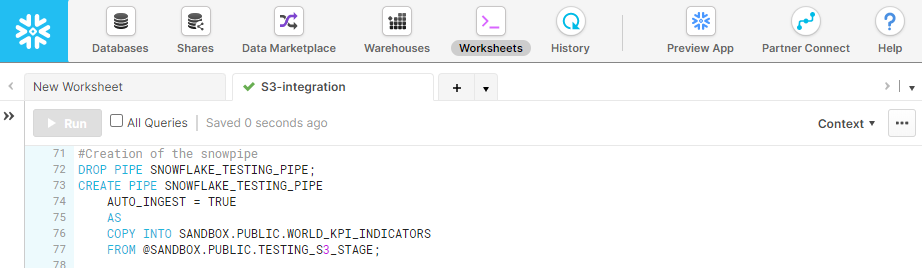
The final step is to get the data loaded from our S3 to Snowflake’s internal S3. This is done through S3, and involves the final step of creating the Snowpipe for loading the data.

Snowpipe Creation

Creating a Snowpipe that automatically loads the data upon creation.

Final Outcome:

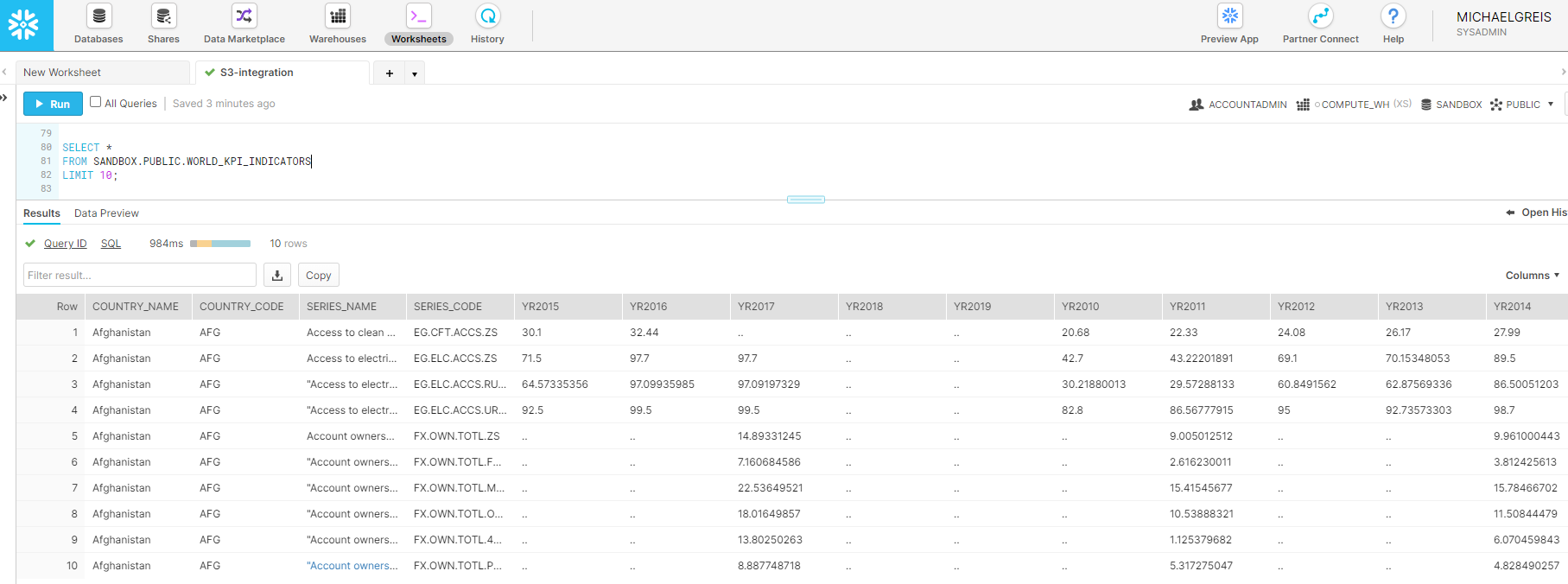
Query Output

Our data has landed!

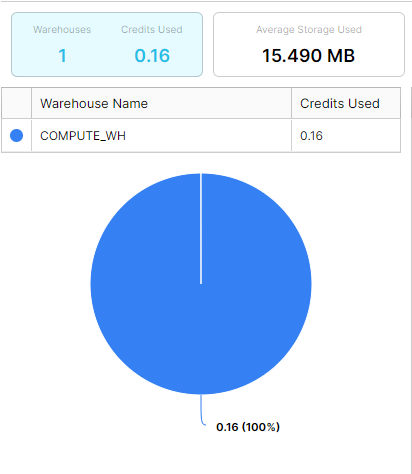
As we see when running a query against our table, the data is now present in Snowflake and available for querying. Additionally, the file that was loaded into Snowflake still exists in our S3 bucket for use in any QA or validation that we want to perform. In our final state, we can also see that Snowflake automatically compressed our data from over 50MB to 15.49MB without any manual intervention.

Snowflake Storage Volume

With automatic compression, the file now takes about ~30% of the storage space that the raw file does on S3.

Going forward, we’ll be exploring some more interesting/impressive capabilities of Snowflake. But starting here, you can see the ease of use, going from no infrastructure to having data feeding into a enterprise scalable data warehouse in less than a couple hours.

From Nothing to Something (The Beginning)

As part of a personal project, which I’m managing (and actively working) here, I’ve decided to do a little write up on my approach, what I’m learning, and other technical things I’ve encountered. This is as much for my own memory, as it is in the hopes that I can help some others avoid the technical pitfalls that I have encountered.

The Product:

I’ve always been someone extremely interested in data, especially data that no one else is looking at. So, what is the logical place to go? The most accessible data is the data that is already out there for the grabbing. So…scraping.

What has no one else scraped, or at least scraped and aggregated AND displayed well? Game prices across different platforms. There’s aggregators for all different kinds of products (ammo, outdoor gear, etc.) but no one seems to have implemented one for games well, although they have tried.

With that goal in mind we are building a product for people to track game prices, and favorite games so that they no longer have to track news on multiple sites and check multiple web marketplaces for the best prices on games. This means we will be scraping Reddit, Twitter, and other news/social media sites, in addition to game marketplaces like Steam and Sony’s Playstore.

What I Hope to Gain:

At the end of the day, maybe we strike gold by building the coolest website and app that ever existed and people love. More realistically, I want to build a platform with which I can add data as needed for my own wants/needs. I want to become expert level  using certain libraries and frameworks, and be at a point where I’m not just a Business Intelligence and ETL developer but can develop all over the stack as needed with ease.

Also, I want to gain experience in setting up a highly performant, extensible, ETL platform off of which I end up with an app on a marketplace and at least one download. All of which will be done on a shoe-string budget. I can then use that platform to pivot and build any sort of data-centric application for whatever purpose/reason I want.

The Steps:

So, with all this being said, there are three main topics I will be writing about on a broad level.

  1. Writing scrapers with Python’s Scrapy library, which run 24/7 around the clock
  2. Writing ETL’s to a Postgresql database with near real time availability and using a budget AWS instance
  3. Serving up the data to end users using an open source tool

More updates in the coming days!

Down with Vertical Database Architecture

The goal of gathering data can be broken down into a combination of any of the following free. Understanding what has happened, what is happening, or project what will happen. When getting answers to these questions, as long as the answer is obtained, why does it matter how the answer was obtained?

Getting a view into this information can be done many different ways, and with the products available on the market can be done for free and with minimal IT know how. There is a time and a place to pay a premium on IT projects to obtain the capabilities that Skyscraper_Diagramnone of your competitors will have. When a solution needs to be scale-able and tailored to your unique needs.

This is when architecture comes in.

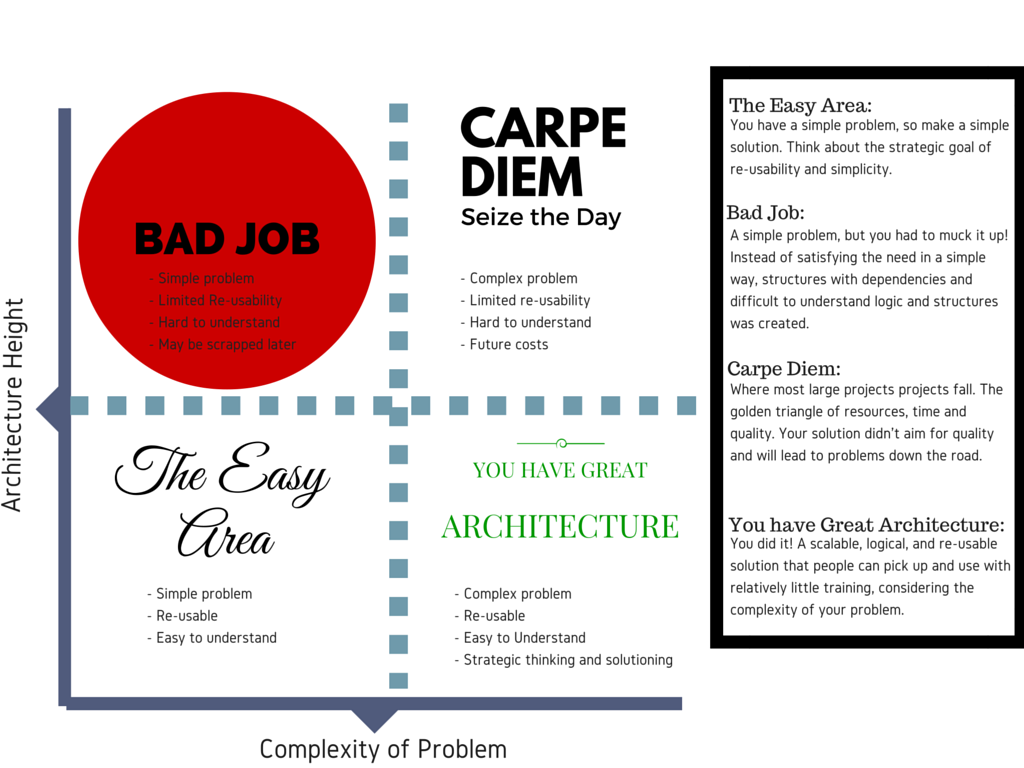
Just like any structure, a database architecture can be flat or tall. What is the difference? To
run with analogy of comparing database architecture to buildings, a skyscraper (vertical) is much more complex to build and maintain compared to a house (horizontal).

Horizontal

A horizontal architecture can be pictured like a suburb. This translates to a house that is commissioned by you that is easily customizable and suited to your needs and wants. Do you want a pool? Easy. Do you want a larger living room or a smaller kitchen? That can be done.

Taking this analogy from building skyscrapers to databases, a flat architecture means that your data is displayed from a single (or as few as possible) levels. It is much easier to understand how the wiring, plumbing, lighting, etc. were put into a house when compared to a skyscraper. Additionally, when you want to install a pool, it’s much easier to install and maintain than a pool on the 23rd floor of a high rise.

Architecture Diagram

Vertical

A vertical architecture means many structural layers in the database, and with it comes complexity. The difference between the physical skyscraper and databases? Skyscrapers are generally created when there is no more land to build flat, this law of physics doesn’t apply to databases.

Why would anyone build a vertical architecture than? In my experience time and resource constraints effect (two thirds of the magic time-resource-quality triangle), short-term thinking.

Benefits of Horizontal

  1. Decrease in cost: Less people to maintain complex solutions, and more time spent creating value for you.
  2. Higher quality: More visibility into what is happening where. Instead of having to dive through and learn how everything was built, people playing with the data only have to learn specific portions which they are interested in.
  3. Faster delivery: The final win on a flat architecture, is speed of delivery. By reducing complexity people spend less time learning, and more time creating value. While in the immediate you may save time in the short-term with a vertical architecture, you will pay dearly in the long-term.