Building a Serverless Data Ingestion – Development Process

This is part two in a four part series on implementing a serverlessJSON based approach using AWS for data ingestion

  • Architecture: What’s the approach?
  • Development Process: How did I set up my environment that was effective and efficient for developing?
  • Difficulties: What issues came up, and how did they get resolved?
  • End results: Does this architecture achieve the goals that it set out to achieve?

One of the biggest blockers to getting started with building out the serverless data ingestion was figuring out the best way to develop code which could be deployed on the different AWS services being used. Traditionally I’ve deployed code to a central server or cluster from which everything could be tested and promoted. Deploy to a server, test on the server, then move to a production server or location on the same server where production files/code live. What happens when there is no server?

Docker

I’d put off learning Docker for quite a while due to the complexity introduced when running Docker, but in this case, being able to replicate the environment Lambda functions run on was the first time Docker clicked for me. Loosely following the excellent tutorial from Nicola Pietroluongo located here, I was able to stumble my way through creating my first dockerfile, resulting the below code which can be found here on GitHub.

FROM amazonlinux
RUN yum update -y
RUN yum install python3 -y
RUN yum install nano -y
RUN yum install zip -y
RUN yum install unzip -y

#AWS CLI Installation
#RUN curl "https://awscli.amazonaws.com/awscli-exe-linux-x86_64.zip" -o "awscliv2.zip"
#RUN unzip awscliv2.zip
#RUN ./aws/install

#create working directory
ADD . /user/src 
RUN pip3 install boto3 -t /user/src/Forsta/Parser

#v1
#Pull base image
#FROM ubuntu:latest

#Installation packages
#RUN apt-get update
#RUN apt-get install -y curl
#RUN apt-get install -y unzip
#RUN apt-get install -y python3
#RUN apt-get update
#RUN apt-get install -y python3-pip
#RUN pip3 install boto3
#RUN apt-get install nano

#AWS CLI installation
#RUN curl "https://awscli.amazonaws.com/awscli-exe-linux-x86_64.zip" -o "awscliv2.zip"
#RUN unzip awscliv2.zip
#RUN ./aws/install


#Add's current directory into container home directory.
#ADD . /home

While tinkering around with different approaches to the code, I was able to add or remove dependencies from the environment as needed (as you can see with all of the commented out packages in the above). I was constantly creating and destroying the environments running two or three commands in my local command line.

When developing on EC2 or other server environments, dependency management has always been a pain and has at times resulted in a bloated environment (slower, higher maintenance costs, etc.). This is due to to the packages that are unnecessary or never used are installed in the environment because they may have been used while developing the code, found to not be the best solution, but not deleted from the server environment. Using Docker was awesome due to the fact that each time I was iterating my code, I was spinning up the environment through the Dockerfile and commenting out the dependencies that weren’t needed, preventing this issue.

Deployment

The development of the code was all done using visual studio code, and once ready for unit tests, the Dockerfile above would be run. The actual python code, along with all dependencies are all placed in the container at the directory location /user/src/Forsta/Parser, as specified in the Dockerfile. If the code resulted in the desired outcome, I then Zip the files along with dependencies.

This Zip file is what we wanted to eventually get into a Lambda function. Once this Zip file was present in the container I spun up, the file was pulled down to my local machine, then uploaded through the AWS Management Console (this could all be automated) and ready to execute since I’d already setup the correct account through IAM.

The actual code getting executed is located here, and shown below.

from tests import test_parser

def lambda_handler(event, context):
    test_parser.t_parser()
    print("Completed")

Code Repo

Most people are familiar with Github at this point. I used GitHub Desktop to maintain the code base entirely on the main branch. Nothing fancy here, as I was working alone on this and able to do the quickest/fastest solution. As a side note, one of the items worth mentioning is that I picked up a code repo from a few years ago to start this (as shown below). I’ve had multiple computers and storage mediums die since then, but being able to pickup the repo and see the history was super useful.

Even if the code had been stored on my local C drive, who knows if I’d have been able to find it or remember why certain things were done. Being able to go through the version history and see the files between commits, helped greatly in refreshing and picking up the code to create these pipelines.

Dynamo DB

From an AWS standpoint, nothing too special. Everything was setup manually, but this could all be automated. Just like the deployment process. I did script out the creation of the landing table as shown below and available in the repo here.

import boto3

def create_landing_table():
    dynamodb = boto3.resource('dynamodb',region_name='us-east-1')

    landing_table = dynamodb.create_table(
        TableName='landing_table',
        KeySchema=[
            {
            'AttributeName': 'uuid',
            'KeyType': 'HASH'
            },
            {
            'AttributeName': 'upload_date',
            'KeyType': 'RANGE'
            }
        ],
        AttributeDefinitions=[
            {
                'AttributeName': 'uuid',
                'AttributeType': 'S'
            },
            {
                'AttributeName': 'upload_date',
                'AttributeType': 'S'
            }
        ],
        ProvisionedThroughput={
            'ReadCapacityUnits':10,
            'WriteCapacityUnits':10
        }
    )

    print('Table Status: ',landing_table.table_status)

In the future, I’m hoping to parameterize the creation of tables as needed. Due to this being a document database, all that needs to be defined is the creation of the unique identifiers. Eventually, I’ll parameterize the creation of the sort keys as necessary for performance.

With all the above, you now have an idea of how I developed on my local machine, deployed code to Lambda, and setup my final landing table in DynamoDB. If you missed the first post in the series which provides an overview of what I was trying to build, you can find that post here.

Building a Serverless Data Ingestion – Architecture

Data and analytics always seems to start with the same problem. How do get the data where it’s needed so that we can start getting insights? The problem isn’t getting the data from point A to B, but doing this in a way that is easy, cost-effective, reliable, and appropriately scalable for the use case. With the rise of the different cloud providers and their toolsets, I thought it would be fun to give a swing at implementing a serverless, JSON based approach using AWS.

This will be series of articles which will be broken down into the following:

  • Architecture: What’s the approach?
  • Development Process: How did I set up my environment that was effective and efficient for developing?
  • Difficulties: What issues came up, and how did they get resolved?
  • End results: Does this architecture achieve the goals that it set out to achieve?

Diving into the architecture plan is outlined below. We’ll go into each of the boxes in detail, but first let’s frame the use case for this project:

I want a solution that can be used in my personal data projects, can scale up to N data ingestion pipelines as needed, and is cheap to operate.

With that goal in mind, the solution uses technologies that support these objectives:

  1. Scalability: All of these technologies can scale from gigabytes to terabytes of data automatically, being fully managed services. Additionally, the Lambda python functions that have been written are entirely serverless.
  2. Cost: Cost is all based upon usage. So if nothing is used, all I’m paying for is storage costs for the storage of persistent data. DynamoDB’s on-demand capacity based pricing charges $.25 per a Gb, so using this service as a landing location before moving into Snowflake is extremely affordable considering the budget.
  3. Upkeep/maintenance: Everything but the data layer is server-less, so no EC2 to keep up. No patching or server status’ needing to monitored. Or the worst case, no script kitties entering into an unprotected servers in my VPC that require me to start over from scratch.

So pretty straightforward from an overall technology standpoint right? The other item to note is how the Lambda functions are written in the python. The idea behind the S3 bucket structure is to funnel all of the data for ingestion into a single location, and ensure that the data is in a similar format to be landed in Dynamo DB.

With the Lambda functions in the GitHub repo here, we ensure that there is a key present that uniquely identifies the exact upload record and it’s origination so I can reuse the upload process for as many different feeds as we want, from whatever buckets we want. Completely configurable to point to a bucket you own, or someone else’s bucket, you can and land it in your own bucket.

Here’s one of the functions demonstrating a super straight forward movement/copy function to get our data to a single ingestion bucket:

# Read data file from S3 location
# Unpack/Unzip into JSON
# Load to landing bucket location
 def copy_object(self,source_bucket,object_key,target_bucket):
   target_object = object_key + str(time.time())
   copy_source = {
    'Bucket' : source_bucket,
    'Key' : object_key
   }
   s3 = boto3.resource('s3')
   landing_bucket = s3.Bucket(target_bucket)
   try:
    landing_bucket.copy(copy_source, target_object)
   except Exception as ex:
    print(ex)
   else:
    print('Success! Object loaded to: ' + target_object)
    return (target_object)

After this, it’s a matter of moving the data along the layers with our Lambda functions, manipulating the data as necessary, and ending up with that data inside of DynamoDB. The idea here being, if we build out the required functions in Lambda, these core python classes used in the Lambda functions to load the data for as many sources as we want, as long as they are similar.

As an example, do you have customer data being sent from many different sources, slightly differently? Well we can get that data into a single DynamoDB table to load into our relational Snowflake database for analytics, or access the data directly using DynamoDB’s API. All of the data in this example is landed in a single table, and can be identified by source for individual processing/analytics.

Although this all sounds straightforward, developing this architecture was truly easier than other side projects/tinkering I’ve done due to the tools that are available to develop Lambda functions and interact with AWS infrastructure. In the next section I’ll talk about the tools I used, how code was deployed, and few other relevant items that made all of this easier to do than expected.

A Foray Into Serious Scraping

It’s been a while since my last post. Getting married, honeymooning, buying a house, etc. took away the time I had for this. But all of that is nearing it’s end, so I’m getting back into the regular cadence of working on the scraping project. Since I’m now back into it, and got everything up and running, I figured the most sensible place to start is the architecture that has been implemented.

The Problem:

The most sensible place to start any discussions of architecture is clearly stating what the system is supposed to do. I need a system that accomplishes these three things.

  1. I need a system that is able to reliably scrape data from any website or consume data from any source.
  2. I need a place where this data can be loaded and reported on in a cohesive format.
  3. I need the product to be lightweight as far as storage space required and CPU so I don’t have to pay out the wazoo.

Overview:

Scraper Architecture

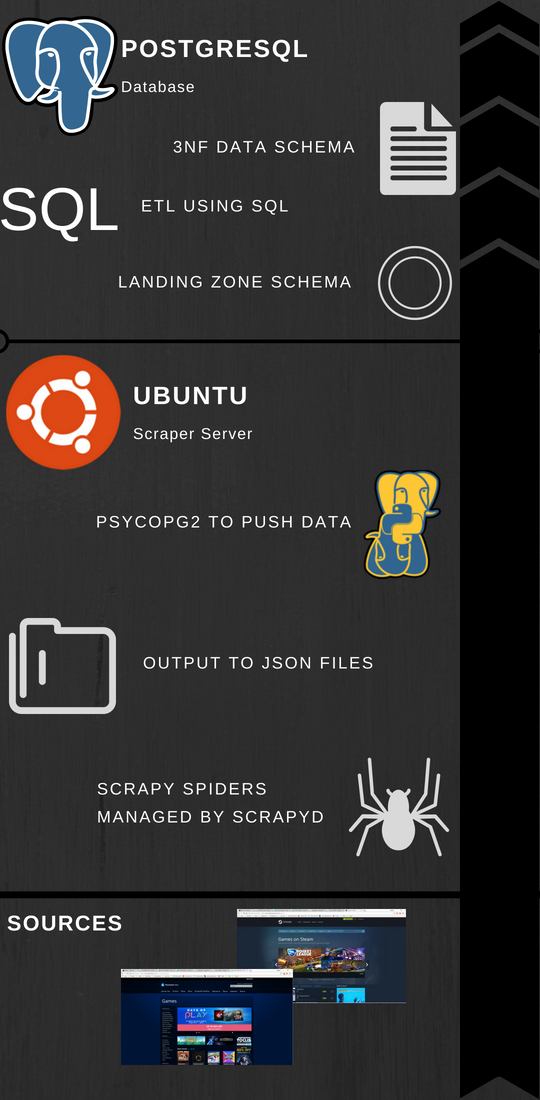
Overview of the architecture, from inputs to database inserts.

In order to meet this, a straightforward architecture was implemented. Using Amazon Web Services both a EC2 instance and RDS instance were set up, with the EC2 being an Ubuntu instance and the RDS being Postgresql. In sequential order, here is how the scraper works.

  1. Using python’s Scrapy library, we’ve written Scrapy projects which look to specific sources to bring in data based upon the HTML on websites. Right now, we’ve targeted two, but can expand to as many as needed. These Scrapy spiders are scheduled through Scrapyd, a framework that no only allows for scheduling and management of spiders, but also offers better performance by operating on Twistd making it asynchronous.
  2. As the spiders are constantly running they are outputting to JSON files on the server. Basically, the driver here is to have a place to drop the output of the data onto the server so that data won’t be lost if something happens with one of the processes.
  3. A Python class was written with Psycopg2 in a way that is meant to be extensible for future data sources. The idea being, that as the data model and data sources are changed/expanded upon, the only thing that will need to change is the class itself. None of the scripts that call the class to insert data from our existing data sources will need to change.
  4. A staging area was created within the RDS PostgreSQL instance which ingests the raw data from the data source. Where possible, a unique index was created that checks for changes before accepting the data into the staging area. As we have scrapers hitting sources repeatedly, we are going to be grabbing the same data. What we’re interested in are the changes, especially in regards to new items or price changes. Also, we want to make as efficient as possible of a architecture so storing only the data we are interested in just makes sense.
  5. Once data has been accepted into the landing zone, the Ubuntu instance is used to schedule a slew of ETL jobs written in SQL and passed to PostgreSQL for execution using Psycopg2. Postgresql doesn’t have a native scheduler readily available, so we use the Crontab functionality of Ubuntu to execute a script for each of our sources that calls from a class containing all of our ETL functions. The end result of this is a 3NF model populated with data and appropriate relationships made.

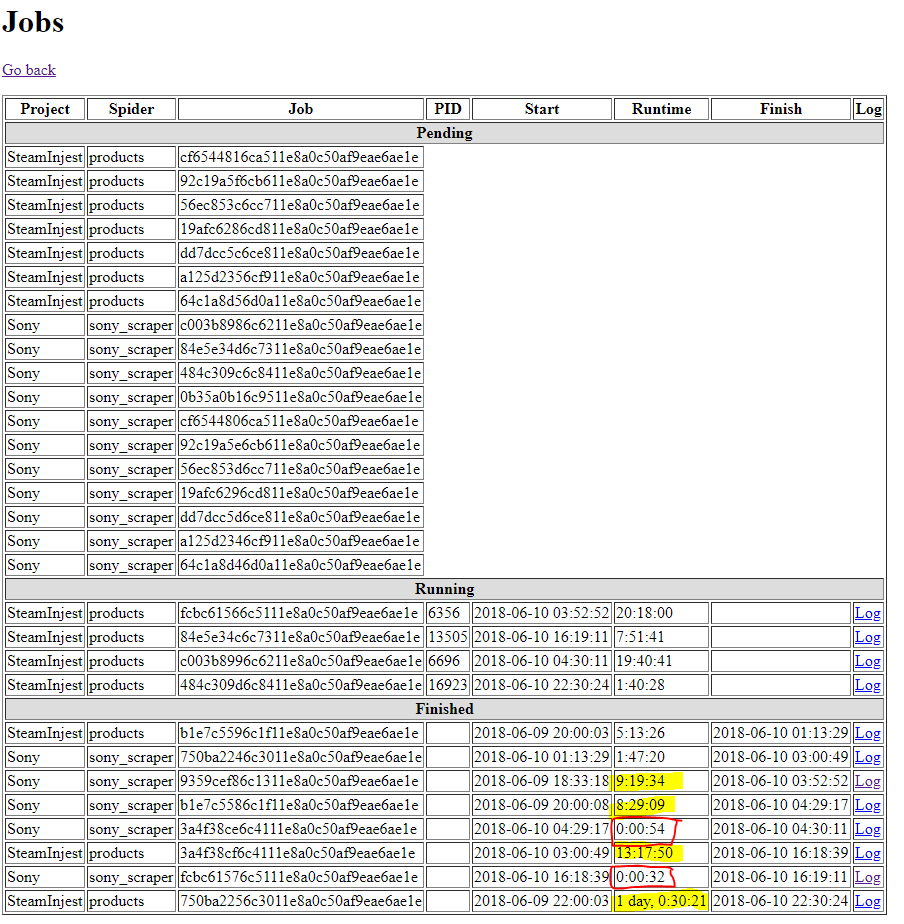
So, it’s now up and running, and data is flowing through into the objects. The data is populating for all tables where it is expected and I could begin reporting price changes today. The best part? All of this was built using $0’s of infrastructure from Amazon Web Services (and a lot of my time). I’m running out of storage space rapidly (20 gigs from the free tier ran out over a couple days), and the CPU is not beefy at all, so stalls out if more than one scraper is running at a time (as pictured below).

scrapyd-performance

Performance goes down dramatically in yellow. In red, my scraper has been blocked from accessing the site (which didn’t happen before refactor…I’ll go into that another time)

To refer back to the original goal, I would say it has been achieved. Not to say that it couldn’t be improved upon and optimized. But overall, the first serious foray into scraping seems to of gone well. Feel free to reach out with any questions, or suggestions!

From Nothing to Something (The Beginning)

As part of a personal project, which I’m managing (and actively working) here, I’ve decided to do a little write up on my approach, what I’m learning, and other technical things I’ve encountered. This is as much for my own memory, as it is in the hopes that I can help some others avoid the technical pitfalls that I have encountered.

The Product:

I’ve always been someone extremely interested in data, especially data that no one else is looking at. So, what is the logical place to go? The most accessible data is the data that is already out there for the grabbing. So…scraping.

What has no one else scraped, or at least scraped and aggregated AND displayed well? Game prices across different platforms. There’s aggregators for all different kinds of products (ammo, outdoor gear, etc.) but no one seems to have implemented one for games well, although they have tried.

With that goal in mind we are building a product for people to track game prices, and favorite games so that they no longer have to track news on multiple sites and check multiple web marketplaces for the best prices on games. This means we will be scraping Reddit, Twitter, and other news/social media sites, in addition to game marketplaces like Steam and Sony’s Playstore.

What I Hope to Gain:

At the end of the day, maybe we strike gold by building the coolest website and app that ever existed and people love. More realistically, I want to build a platform with which I can add data as needed for my own wants/needs. I want to become expert level  using certain libraries and frameworks, and be at a point where I’m not just a Business Intelligence and ETL developer but can develop all over the stack as needed with ease.

Also, I want to gain experience in setting up a highly performant, extensible, ETL platform off of which I end up with an app on a marketplace and at least one download. All of which will be done on a shoe-string budget. I can then use that platform to pivot and build any sort of data-centric application for whatever purpose/reason I want.

The Steps:

So, with all this being said, there are three main topics I will be writing about on a broad level.

  1. Writing scrapers with Python’s Scrapy library, which run 24/7 around the clock
  2. Writing ETL’s to a Postgresql database with near real time availability and using a budget AWS instance
  3. Serving up the data to end users using an open source tool

More updates in the coming days!

What Should Documentation Be?

The problems Business Intelligence organizations solve in organizations are generally the same. Pull some data out of somewhere, synthesize the data, analyze it, then create a picture of what is happening, what is going to happen, or what has happened. Working in small and large organizations, I’ve had the pleasure of seeing a variety of different processes used to deliver these insights. These range from the overbearing, and associated documentation that crush people’s productivity, to the lightweight that creates quicksand beneath teams feet through the lack of knowledge transfer.

Seeing the overbearing and the extremely light weight, there’s one conclusion I’ve arrived at concerning documentation…

Document as Little as Possible


documentation_joke

Relevant literature

Don’t commit time to things that aren’t creating revenue or helping the business. Looking at IT projects, there is no doubt that the more documentation that there is, the less value there is. The perfect example came about when having a beer with a former co-worker.


It was brought up that the process at the company we both previously worked at had documentation that took longer to create then coding, testing, and implementing the change. Additionally, this painstakingly crafted documentation that the engineer had to spend time tracking down information for didn’t result in documents that would be useful to the team doing the work going forward. The process decreed that you must document X, Y, and Z in order to deploy the change/implementation so that’s what was done. The fundamental truth is that the “…benefit of having documentation must be greater than the cost of creating and maintaining it.”

Some people believe in the exact opposite of over documentation. Nothing should be documented. The code/implementation should speak for itself. This may work when you have a small size IT application the will always be managed by the same group of individuals (which likely won’t happen). Once you reach an application spanning multiple servers, teams, and databases the expectation for the code/implementation to “speak for itself” in a timely manner to those who have to report and get analytics out is unreasonable.

So, what’s being proposed in this rant? The only useful documentation that I’ve seen documents the “Why” and the “How”. Everything else doesn’t create value for the organization, as the cost to maintain and develop the documentation is too high.

Why

Creating a BI Product entails connecting the business process to an application(s) or database(s). Depending on the environment that you’re working in, Inmon, Kimball, or something else entirely, you need to know the answer to why things in your system exist. The “Why” is important not only from a high leadership level, but also at a low technical implementation level. The “Why” statement done at the low level helps to ensure that a team is using previously created tools and implementations as designed. And if a change is made that goes against the original “Why”, it is intentional and by design.

As an example, working on the Vehicle Profitability by VIN project, the Data Architect created both Inmon (3-NF) and Kimball (dimensional reporting) structures on the project. The “Why” was made extremely apparent through documentation, so the teams knew how to use the current implementation to achieve their goal in the best way possible.

Are you importing new invoice data? That should go into the wholesale invoice structure so that it flows up in the existing fact that contains the revenue information for vehicles which our reports feed from. Why? Because we want a single source of truth for vehicle revenue.

When documentation providing the “Why” for technical implementations exists, it makes adding on and changing the existing processes and assets easier. As opposed to re-inventing the wheel over and over.

How

Payment-Data-Flow-Diagram

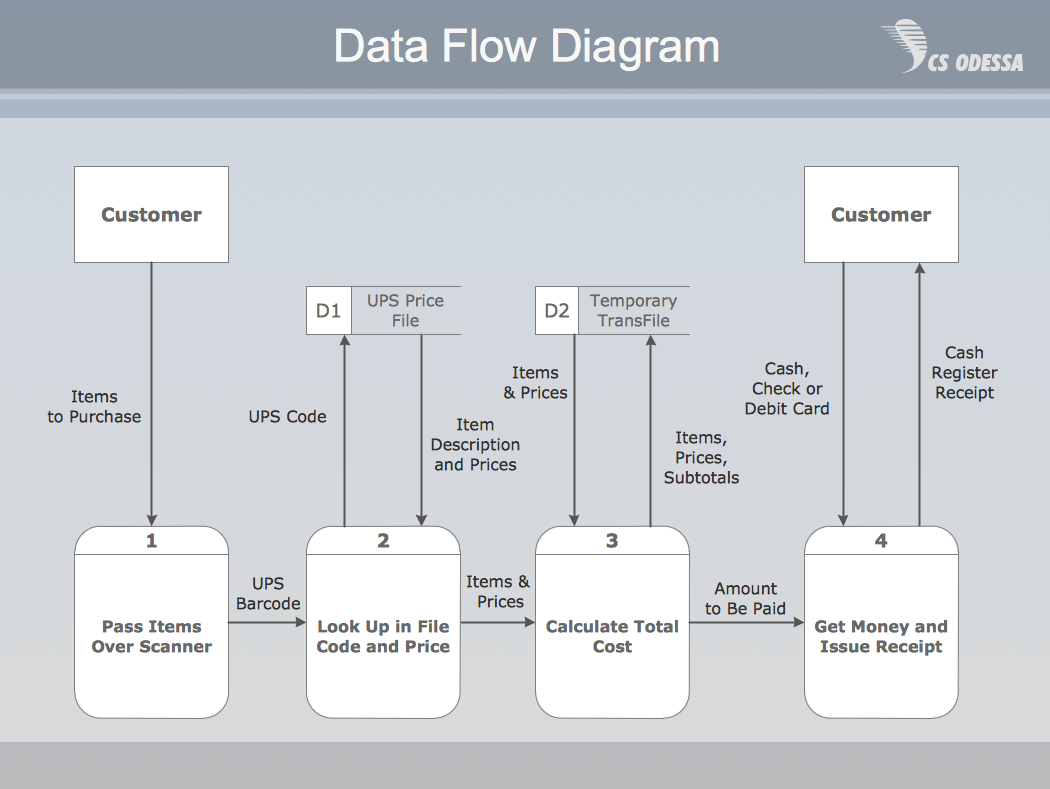
basic data flow diagram

So after we know why something exists, the other piece that is useful for documentation is the “How”. The “How” shouldn’t be step by step instructions, it should function like a high level map. Data Flow Diagrams are a great example of “How” documentation that I’ve found useful for Business Intelligence products. Armed with the Data Flow Diagram and the “Why” of the design, team members who need to report on, extend, maintain, or refactor a system will be able to make informed decisions.


Make It Useful

At the end of the day, documentation gets in the way of creating code/analysis/direct business value. So the argument for spending time creating documentation is hard to make when someone hasn’t experienced the pains associated with lack of documentation. Lack of architecture that makes sense, misreported numbers, time wasted building processes that do exactly what existing processes already do.

Without documentation, maintaining and using a system or process as intended is impossible. With documentation that is accessible, searchable, and focuses on the “How” and “Why”, organizations can make smart and informed decisions of where to spend time, how to tweak things, and how to get value from their assets.


Data Day Texas 2017 – A Few Thoughts

Earlier this month I had the opportunity to attend Data Day Texas, and thought that it would be worthwhile to jot down a few thoughts. For those that aren’t aware of Data Day Texas, think of it as a gathering of nerdy IT people and Data Scientists. It was an interesting weekend with a wide range of topics that encompassed everything from machine learning algorithms to more approachable subjects like data dashboarding.

Graphs Are Here

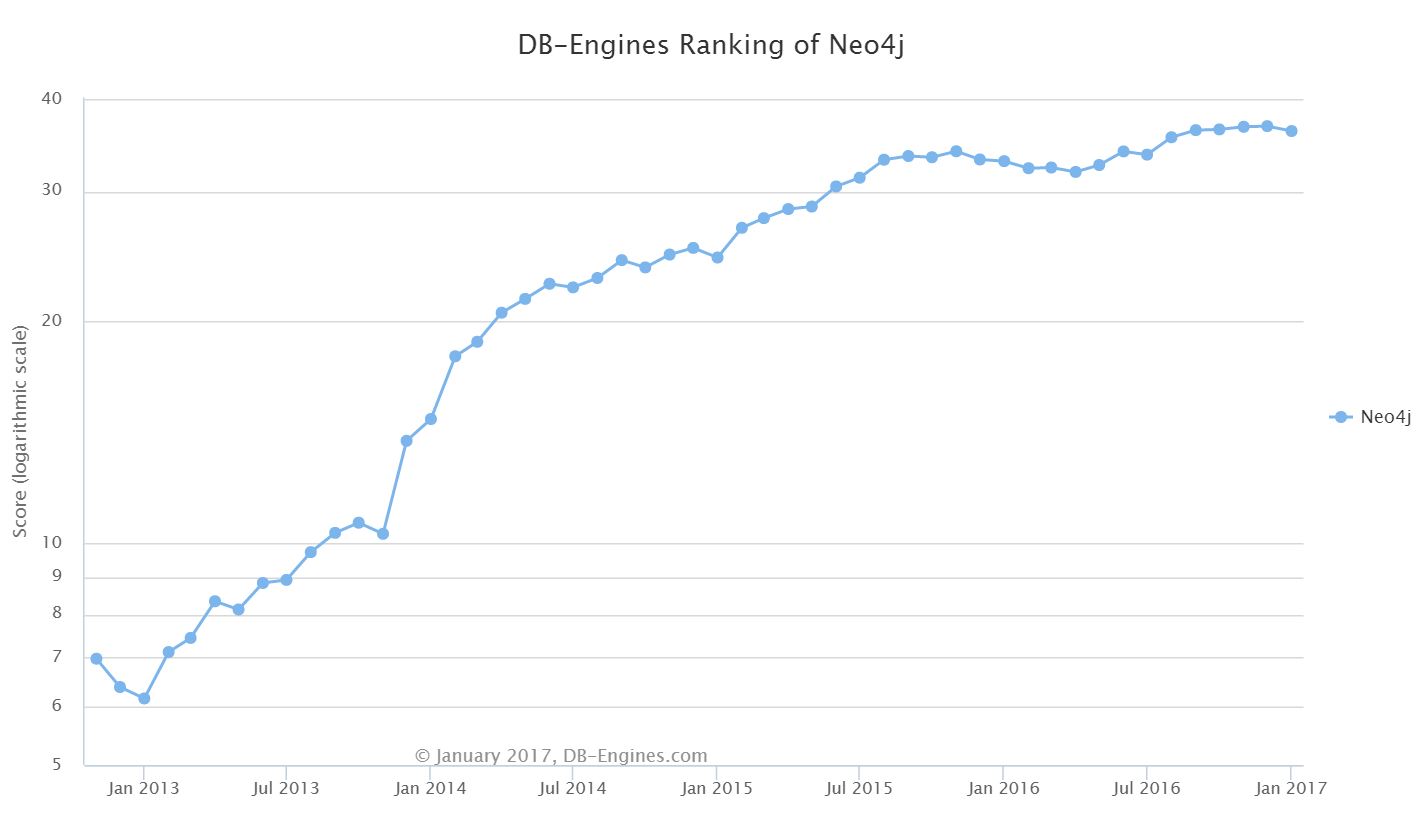
There’s a reason that the keynote by Emil Eifrem was named “The Year of the Graph”. Looking at the popularity trend on db-engines.com, you can see a large gain in the

neo4j-popularity

Neo4j Popularity

popularity of Neo4j. Leading naturally to the question, so what?

I think the major winning point for graph databases, other than performance on certain types of data analytics, is that graph databases are defined with relationships between data. This is in opposition to the approach of the traditional RDBMS which requires explicitly defining the tables in the schema, with relationships as a non-required afterthought in most cases. This means that while constructing the database, what you are doing is explicitly defining the node (core piece of data) and the edge (relationship between nodes). This means that you are enforcing the relationships between data, as opposed to the structure of the data itself. This creates another level of abstraction between the end user and the data, which should make the data in the database more approachable. Oh, and if you haven’t guessed, graph databases are schema-less which is a plus in many cases.

Issues Are Similiar Across Companies/Technology

In particular, there were two talks that hit this point home. The first was given by Chris LaCava from Expero Inc. in which he discussed visualization techniques with graph databases. The second was the discussion of how Stitch Fix sets up their environment for data scientists to work by Stefan Krawczyk.

What’s the root of this? People want to use the tools that work and that they like. Chris LaCava discussed how to do visualization on graph databases. While graph databases can

dashboarding-design-process

Look familiar? From Chris’ presentation on graph database dashboarding

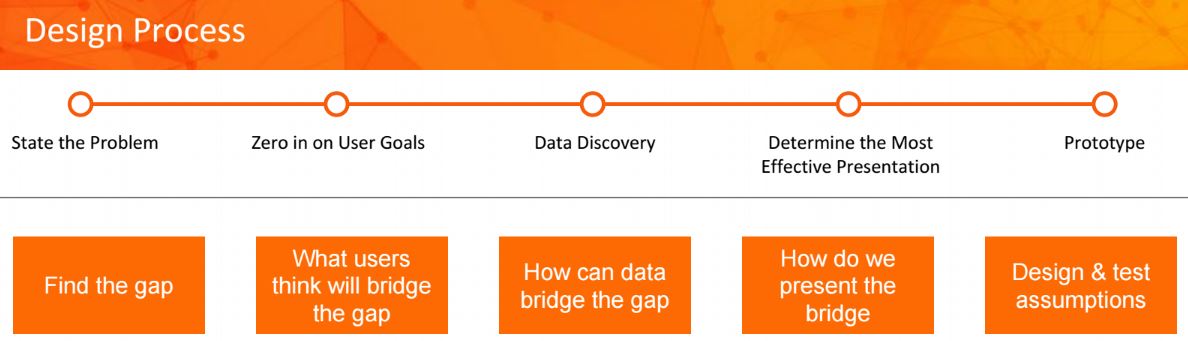
meet some cool use cases as far as data sets and real time analytics go, what was discussed was a  straight forward and common sense approach to dashboarding. Anyone familiar with Business Intelligence and dashboarding should roughly be following the above, or near to it.

Stefan‘s talk was all about using Docker to enable data scientists to use the tools that they want to use. The solution to the complaint that many of us in the industry have when we are locked in with a specific tool-set. The differentiation here was that Stitch Fix has done containerization at scale. This solves that problem by allowing each of their data scientists to run and operate on their own environment, with whatever tool-set they favor to deliver business value.

The Story is What Makes Things Interesting

The final point, which I’ve written about before, is that the story is what makes things interesting. The specific story presented at Data Day? The Panama Papers and how Neo4j was used to discover the unlikely connection that led to the downfall of a Prime Minister. That this was the best marketing tool that I have ever seen in regards to a database.
Having a database GUI that allows for easy exploration of the data natively? That’s a game changer.

This slideshow requires JavaScript.

Looking at the above, you can see a traditional RDBMS GUI (SQL Server Management Studio) versus Neo4j’s GUI. There’s a reason why people don’t pull up SQL Server Management Studio tools to tell a story. Having a database platform that can automatically tell a story about the data is an awesome approach.